





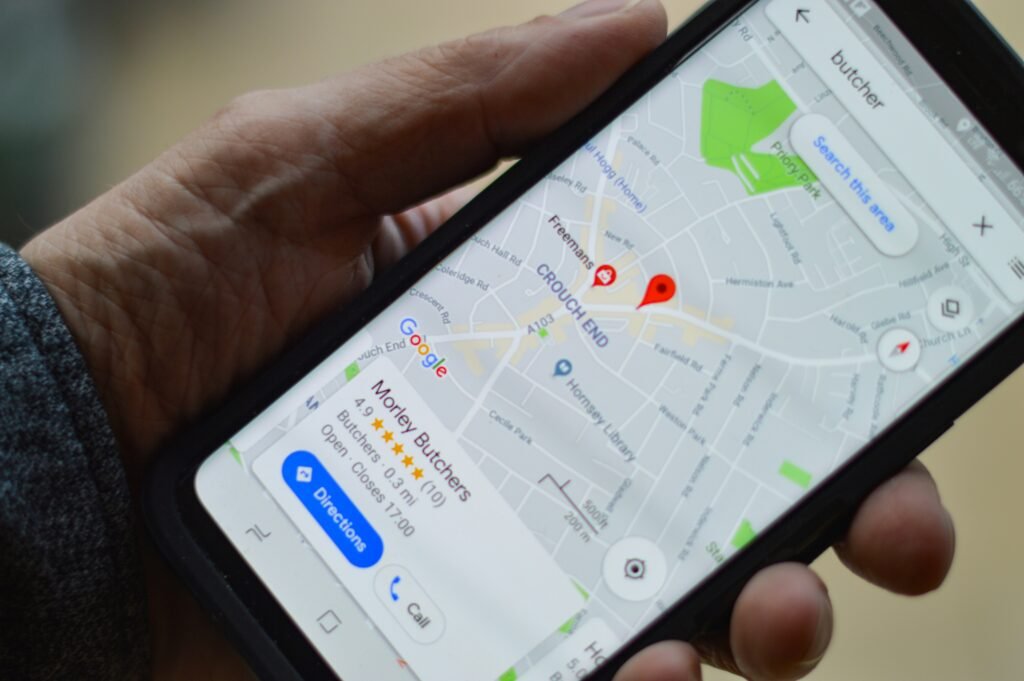
Local SEO for small businesses is the work of making your business easy to find when nearby customers search Google for what you sell. It covers your Google Business Profile, reviews, local keywords, service and location pages, and how easily people can contact you.
Someone has a leaking pipe, so they search “plumber near me.” Someone else wakes up with severe tooth pain and searches for an emergency dentist. A homeowner notices missing shingles and looks for a roofing company in their city.
These people are not passing time on Google. They have a problem and may be ready to call, book, or request a quote.
Now think about what happens if your business does not appear. The customer does not stop searching. They call one of the businesses that Google shows instead.
That is the gap local SEO closes. It helps your business appear in Google Maps, the local pack, and regular search results at the moment someone nearby is ready to buy.
Below are 10 practical ways to improve local SEO for your small business, plus the mistakes to avoid, realistic timelines, and a checklist you can work through.
Key takeaways
- Your Google Business Profile is the foundation of local visibility, so claim it and complete every field.
- Google ranks local results mainly on relevance, distance, and prominence (how well known your business is).
- Consistent contact details, genuine reviews, and focused service pages build trust with both Google and customers.
- Measure calls, bookings, and leads, not just rankings.
What Is Local SEO, and Why Does It Matter for Small Businesses?
Local SEO is the part of search engine optimization that focuses on searches tied to a place, such as “dentist in Denver” or “plumber near me.” It matters for small businesses because these searches often come from people who are ready to call, visit, or book.
Regular SEO can help a website reach people in many places. Local SEO focuses on searches connected to a particular location.
For example, a national accounting software company may want customers across the country to find its website. A plumber in Atlanta cares more about appearing when someone in Atlanta needs a plumber. A customer two states away is unlikely to become a useful lead.
Local SEO for small businesses can help a company appear in:
- Google Maps
- Google’s local results
- Regular organic search results
- Searches that include a town, city, or neighborhood
- “Near me” searches
Search for “AC repair near me,” and Google may show a map with several nearby companies above the usual website results. This is often called the local pack.
If your competitors appear there and your business does not, they get the first chance to win the customer. More website visits can help, but traffic alone does not pay your bills.
You want calls. Appointments. Store visits. Quote requests. Bookings.
A useful local SEO strategy helps the right people find you when they need what you sell.
How to Improve Local SEO for Your Small Business: 10 Steps
If you are starting from scratch, work through these steps in order. If the basics are already in place, start with the step where your business is weakest.
1. Set Up and Fully Optimize Your Google Business Profile
A Google Business Profile is the listing that can appear in Google Search and Maps. It may show your name, address, phone number, hours, reviews, photos, services, and website.
If you have not claimed your profile, start there. If you manage it, check every part instead of assuming it is correct.
Look at your:
- Business name
- Primary and secondary categories
- Address or service area
- Phone number
- Website
- Business hours
- Services
- Business description
- Photos
- Other details customers need
Your primary category matters because it tells Google what your business mainly does. A roofing company should choose the category that most closely describes its main work. It should not pick a broad or loosely related category because the wording sounds useful.
Google says complete and accurate business information makes a profile more likely to appear in local results. It also explains that local rankings mainly depend on relevance, distance, and how well known the business is. You cannot control where the searcher stands, but you can give Google clearer information about what you do. You can read Google’s explanation of local ranking.
Search for your business on Google and open the profile. Is everything a customer needs to contact or choose you there, and is it accurate? If not, fix the missing or outdated details first.
2. Make Sure Your Business Information Is Consistent Online
You may hear an SEO company talk about NAP. It simply means your business name, address, and phone number.
Those details should be consistent wherever your business appears online. Imagine that your website lists one phone number, Facebook lists another, and an old directory still shows your previous address. Google now has different versions of the same business information. Customers have the same problem.
Check the places where people are most likely to find you:
- Your website
- Google Business Profile
- Yelp
- Bing
- Local directories
- Industry directories
- Important supplier or partner websites
Your opening hours should also be correct, especially during holidays. A customer who drives to your store because Google says you are open will not be pleased to meet a locked door.
Start with the listings customers use. Correct the major ones first, then deal with respected local or industry sites that matter to your business.
3. Target the Local Keywords Your Customers Actually Search
Keywords are the words people type into Google. The mistake many businesses make is choosing them from the owner’s point of view rather than the customer’s.
“Plumber” is broad. “Emergency plumber in Dallas” tells you more about the service and location. “24-hour plumber near me” also shows that the person may need help now.
Customers may search in several ways:
- Service + city
- Service + neighborhood
- Service + “near me”
- Problem + location
- Specific service + location
Intent matters as much as the words. Someone searching “why is my AC making noise?” may still be trying to understand the problem. Someone searching “AC repair near me” is probably closer to calling a company.
Both searches can matter. An article can answer the first question and bring the customer to your business earlier. A strong service page can meet the second person when they are ready to hire.
Google Search Console can show some searches that already bring people to your website. Customer calls, emails, and sales conversations can also show you the words people use to describe a problem.
Write down the five services that make your business the most money. Then ask yourself: What would someone type into Google if they needed each service today?
4. Build Strong Service Pages Instead of Trying to Rank One Page for Everything
Many small-business websites have one Services page with a short list of everything the company offers. That may tell a visitor what you do, but it gives Google and the customer little information about each service.
A roofing company, for example, may need separate pages for:
- Roof repair
- Roof replacement
- Emergency roofing
- Commercial roofing
- Roof inspections
Each page can focus on one need. A person looking for emergency roof repair does not want to dig through a general page to find two sentences about leaks.
A useful service page should explain what the service is, who may need it, which problems it solves, and what the work involves. It should also cover the area you serve, why a customer might choose your company, and what they should do next.
Do not repeat the keyword in every paragraph. Answer the questions that could stop a customer from calling. Explain costs where possible, or explain what affects the price. Show real work, qualifications, guarantees, or customer comments when they help the customer decide.
One focused page gives you more room to answer the search properly. It also lets you send visitors to the exact service they need.
5. Create Location Pages When You Serve More Than One Area
A contractor may serve five nearby cities. A cleaning company may work across several neighborhoods. In cases like these, location pages can help customers find the right service in their area.
For example, a roofing company could create a page called “Roof Repair in Arlington, VA” instead of expecting one general roofing page to rank in every city it serves.
But location pages become useless when a business creates dozens of copies and changes only the city name. Customers notice the thin content. Search engines can also see that the pages offer little that is new.
Give each location page a reason to exist. You might include:
- Services available in that area
- Local projects and photographs
- Reviews from customers there
- Neighborhoods you serve
- Details that affect the service locally
- Questions customers in that location ask
- The best way to contact you
Only create a page when you serve the location and have something useful to say about it. Ten specific pages are more useful than 50 weak copies.
6. Get More Google Reviews and Respond to Them
Imagine two plumbers appear beside each other. One has eight reviews. The other has 180, including recent comments, customer photos, and replies from the owner. Which one would you call first?
Reviews help people judge a business before making contact. They can also affect local visibility. Google states that more reviews and positive ratings can help local ranking, though reviews are only one part of the picture.
Ask real customers for honest reviews and make the process easy. You could send a direct review link by text or email once the work is complete. Do it consistently instead of asking everyone during one busy week and then forgetting for a year.
Reply to positive reviews naturally. Avoid pasting the same response under every comment. When someone leaves a negative review, respond calmly and deal with the issue. Future customers will read your reply too.
Do not buy reviews or offer rewards in exchange for positive ones. Google’s policy says reviews should reflect a genuine experience, and it can restrict profiles that break its fake-engagement rules. Those restrictions can include blocking new reviews or hiding existing ratings. See Google’s Business Profile restriction policy.
7. Create Content Around Real Questions Local Customers Ask
“Start a blog” is weak advice unless you know what the blog should cover.
Listen to your customers instead. What do they ask before buying? Which worries come up again and again? What does your team explain several times each week?
A roofer may hear questions such as:
- How much does roof repair cost?
- Can a leaking roof be repaired without replacement?
- How long does roof replacement take?
A dentist may hear:
- How much does a dental implant cost?
- What should I do if I break a tooth?
- Does teeth whitening hurt?
Each question can become an article, guide, or FAQ. It can bring people to your website while they are still working out what to do.
Keep the article connected to the next step. A guide about fixing a leaking roof should link to the roof repair page. An article about a broken tooth should make it easy to find the emergency dental service.
Use your own experience. Explain what you see on real jobs, what affects the cost, and which mistakes customers make.
8. Earn Local Links and Mentions
A backlink is a link from another website to yours. For a local business, its source and relevance matter more than collecting many random links.
Useful local links and mentions may come from:
- Local news websites
- Chambers of commerce
- Community groups
- Local business groups
- Suppliers and partners
- Industry associations
- Sponsorships and community events
Suppose a construction company sponsors a local event. The organizer lists the sponsors on its website and links to the company. That mention makes sense because there is a real connection between the business and the community.
Buying hundreds of links from unrelated websites is not a local SEO strategy. It can waste money and create risk. Earn mentions that a real customer might reasonably come across.
9. Make Sure Your Website Works Well on Mobile
Someone whose car has broken down is probably not sitting at a desk comparing mechanics. They are standing beside the car with a phone in their hand.
Open your website on your own phone and try to use it as a customer would. Can you read the text without zooming? Does the page load quickly? Can you find the right service? Can you tap the phone number and call?
Pay attention to:
- Mobile-friendly design
- Loading speed
- Readable text
- Clickable phone numbers
- Short contact forms
- Clear directions
- Simple navigation
- Clear calls to action
Ask yourself one question: If you opened your website on your phone right now, how quickly could you call, book, or request a quote?
If the answer is “not quickly,” fix that. For some businesses, a faster, simpler website may do more for leads than any other task on this list.
10. Track Whether Local SEO Is Actually Bringing You Customers
Rankings can show progress, but they are not the final result. A number-one position has little value if it brings the wrong visitors or no enquiries.
Track actions connected to the business, such as:
- Calls
- Contact-form submissions
- Appointment bookings
- Quote requests
- Visits from organic search
- Google Business Profile interactions
- Direction requests
- Leads from service and location pages
Separate visibility from results. If more people see your business but few contact you, something else may be wrong. Your offer may be unclear. Your reviews may be weaker than the businesses around you. The page may be slow, or the contact form may ask for too much information. You may even be ranking for searches that rarely lead to paid work.
Tracking helps you see where the gap is. Without it, you can spend months paying for SEO and still have no clear answer when someone asks what it produced.
Common Local SEO Mistakes Small Businesses Should Avoid
Local SEO for small businesses often goes wrong in ordinary ways. Watch for these mistakes:
- Creating a Google Business Profile and then ignoring it
- Showing different contact details across important websites
- Targeting only broad keywords
- Forcing city names into sentences where they do not belong
- Creating many location pages with almost identical content
- Buying fake reviews
- Paying for large batches of poor-quality links
- Making customers struggle with a slow or confusing mobile website
- Publishing articles that do not answer customer questions
- Measuring the work only through rankings
Keep a simple record of the work and the leads you receive. You should be able to connect each SEO task to a business reason.
How Long Does Local SEO Take to Work?
For most small businesses, simple local SEO fixes, such as correcting your hours or completing your Google Business Profile, can show up within days or weeks. Competitive rankings usually take months, depending on your market, competitors, reviews, and website.
There is no fixed timeline that applies to every business. A new roofing company in a competitive city does not start from the same position as an established dentist with hundreds of reviews and a website that has ranked for years.
The time needed depends on your location, competitors, website condition, existing reviews, content, Google Business Profile, and the amount of work required.
Some changes can show up quickly. Correcting your opening hours or phone number may update the information customers see without a long wait. Fixing an incomplete profile can also improve how clearly your business is presented.
Competitive rankings usually take longer because you are trying to earn a place above businesses that may have stronger websites, more reviews, more useful pages, and a longer local history.
Ask for progress you can inspect. Are important pages indexed? Is the profile complete? Are calls or enquiries moving in the right direction? A provider should explain what has changed rather than hide behind “SEO takes time” every month.
Can You Do Local SEO Yourself, or Should You Hire an Agency?
Yes. Most small businesses can handle the basics of local SEO themselves, including their Google Business Profile, contact details, photos, and reviews. Hiring help makes more sense when you need keyword research, technical fixes, content planning, link building, or tracking across several locations.
Google itself says that a small local business can probably do much of the work, especially when the owner takes time to learn the basics.
You may be able to update your Google Business Profile, correct your contact information, upload photos, ask customers for reviews, and write down the questions people ask.
The work becomes harder when you need keyword research, technical SEO, competitor analysis, a better website structure, content planning, link building, or reliable tracking. Managing several locations adds another layer.
If you hire help, ask what the person plans to change and why. Our guide on how to choose an SEO agency for your small business covers the questions worth asking. Ask how success will be measured. Be careful with anyone who guarantees the top position on Google. Google’s own guide to hiring an SEO says no one can guarantee a number-one ranking.
Could you learn local SEO yourself? Yes. But is that where your time creates the most value for your business?
The answer depends on your time, budget, and website. You should still understand the basic work, even if you hire someone.
Local SEO Checklist for Small Businesses
Use this checklist to keep track of the local SEO tasks that matter most for small businesses.
- Claim and verify your Google Business Profile.
- Complete all important profile information.
- Check your business name, address, and phone number online.
- Research the local keywords customers use.
- Create useful pages for your main services.
- Build specific location pages where they make sense.
- Ask satisfied customers for honest reviews.
- Respond to customer reviews.
- Publish content that answers real questions.
- Earn relevant local links and mentions.
- Test your website on a phone.
- Track calls, leads, bookings, and other conversions.
Start with the item most likely to stop a customer from finding or contacting you. Then work through the rest.
Local SEO for Small Businesses: Frequently Asked Questions
Regular SEO helps a website reach people wherever they search. Local SEO focuses on searches tied to a location, such as “roofer in Tampa” or “bakery near me,” and relies heavily on your Google Business Profile, reviews, and location-specific pages.
The local pack is the map and short list of nearby businesses that Google often shows above the regular results for local searches. Appearing there puts your name, rating, phone number, and directions in front of customers before they scroll.
Claim and verify your Google Business Profile, choose the most accurate primary category, and complete every field. Keep your name, address, and phone number consistent online, collect genuine reviews, and add real photos. Google then ranks local results on relevance, distance, and prominence.
You can appear in Google Maps with only a Google Business Profile, but a website makes local SEO much more effective. Service and location pages give Google more information about what you do and give customers a place to compare, call, book, or request a quote.
Yes. Google says more reviews and positive ratings can help local ranking, although reviews are only one factor. They must come from real customers. Buying reviews or offering rewards for positive ones can lead Google to restrict your profile.
For most businesses that serve customers in a specific area, yes. Local searches often come from people who are ready to call, visit, or book. To judge whether it is working, track calls, leads, and bookings rather than rankings alone.
Get Found When Local Customers Are Ready to Buy
For small businesses, local SEO is not a race for a ranking you can show off. The point is to give your business a fair chance when someone nearby needs what you sell.
That means keeping your Google Business Profile accurate, building pages around real services and locations, earning honest reviews, answering customer questions, and making the website easy to use. It also means tracking calls, bookings, and leads so you know whether the work helps the business.
Your next customer may already be searching. The question is whether they can find enough accurate and useful information to choose you.
Success Instigators can help you see where your business currently stands in local search, what may be holding it back, and which changes could help you reach more customers in the areas you serve. If you are getting little from Google or cannot explain what your current SEO work is producing, get in touch and we will show you where to start.